




Modern Security Operations Centers face an overwhelming volume of alerts — most teams spend hours triaging events that could be handled in seconds with proper automation. Existing SIEM platforms offer rules-based correlation, but lack the contextual reasoning needed to handle novel threats or complex multi-step investigations.
SentinelFlow is a full-stack SOC automation platform that combines a LangGraph-powered multi-agent orchestration runtime with a React WebUI for alert management and operator collaboration. Instead of rigid playbooks, you get a flexible, extensible agent system where a Primary Supervisor Agent coordinates specialized Worker Sub-Agents — each equipped with pluggable Skills that can call external APIs, run enrichment scripts, close tickets, and more.
- Multi-Agent Orchestration — Supervisor + Worker SubGraph pattern via LangGraph, with sequential and parallel worker delegation plus supervisor-guided workflows
- Full Operator Console — Unified WebUI for Overview, Alert Workbench, Task Center, Conversation Console, Skills, RAG, Agents, Workflows, Settings, and run-log inspection
- Pluggable Skill System — Drop a
SKILL.md+main.pyinto the local plugin workspace; agents discover and invoke them automatically with granular per-agent permission control - Dual Entry Points — Accepts both raw security alerts (JSON payloads from SIEM/SOAR) and free-form human commands via the WebUI conversation console
- Agent Workflow Engine — Define reusable multi-step workflows for high-frequency scenarios; the Primary Agent loads the plan, then calls each worker with concrete step prompts
- Multi-Source Alert Ingestion — Configure multiple named alert sources, each using REST/HTTP polling or a Python script entrypoint with its own parser and schedule
- AI-Assisted Parser Generation — Paste a sample alert payload and let the LLM auto-generate the field-mapping parser rule, with preview and one-click apply
- Source-Scoped Async Auto-Execution & Retry — Enable the background executor per alert source, process queued alerts asynchronously, and retry failed tasks after source-specific delays
- Approval & Resume Flow —
approval_requiredskills pause manual graph execution, surface approval cards in the UI, then resume from checkpoint after approve/reject - Run-Local Context Window Control — Each LLM call receives a budgeted
llm_prompt_viewwith task anchors,case_context, recent ReAct turns, and compact tool records while full state/checkpoints/run logs remain lossless - SOC Execution Guardrails — Authority traces, key facts, task-anchor selection, and pre-execution input checks help agents keep target IPs, recipients, event IDs, and closure facts precise
- Thinking-Model Adapter — Optional settings toggle for providers such as DeepSeek that need explicit
thinking: disabledrequest bodies - Fine-Grained Governance — Per-agent skill permissions, mode-aware worker allowlists, execution approval gates, audit logging, and agent-level model overrides
- Large-alert-volume stability path — Alert lists, dashboard counters, weekly summaries, and new-alert notifications now use lightweight row queries or dedicated SQL aggregates instead of pulling full task payloads, keeping the WebUI responsive on large SQLite queues.
- More reliable live data loading — Poll/resource stores now use background refresh, coalesced force reloads, and safer cache reuse so Alerts, Overview, Skills, and Agents pages remain smooth during frequent polling.
- Plain-text skill invocation hardening —
execute_skillaccepts normalized plain-text JSON arguments, surfacesinput_schemahints directly to the model, and keeps schema validation/audit records tighter for hybrid skills. - Real closure execution enforcement — When a delegated task requires a terminal closure/disposal action, workers must actually call the authorized closure skill; prose claims or mocked JSON no longer count as successful completion.
- Safer Settings persistence UX — The Settings page now tracks real dirty-state changes more accurately, avoiding false "unsaved changes" behavior during ordinary configuration edits.
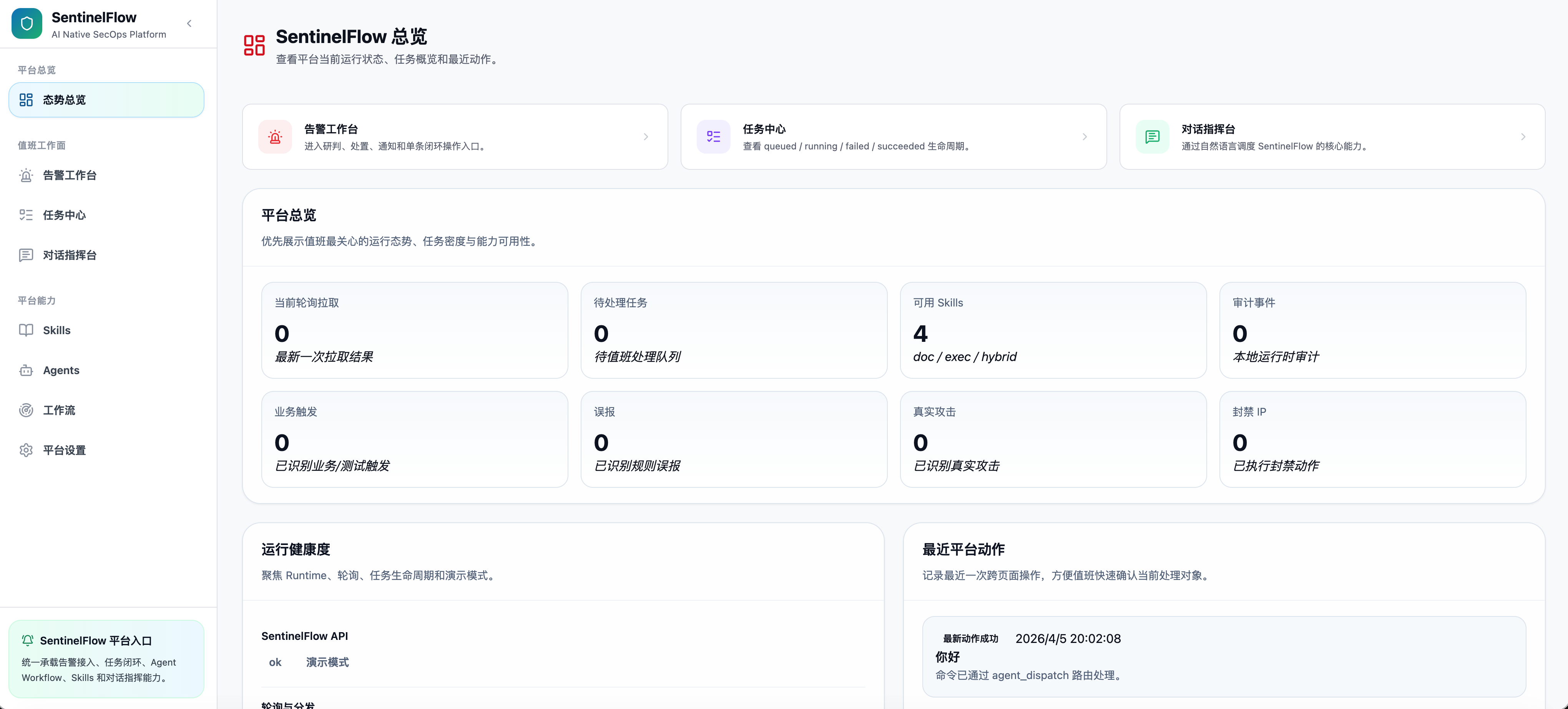
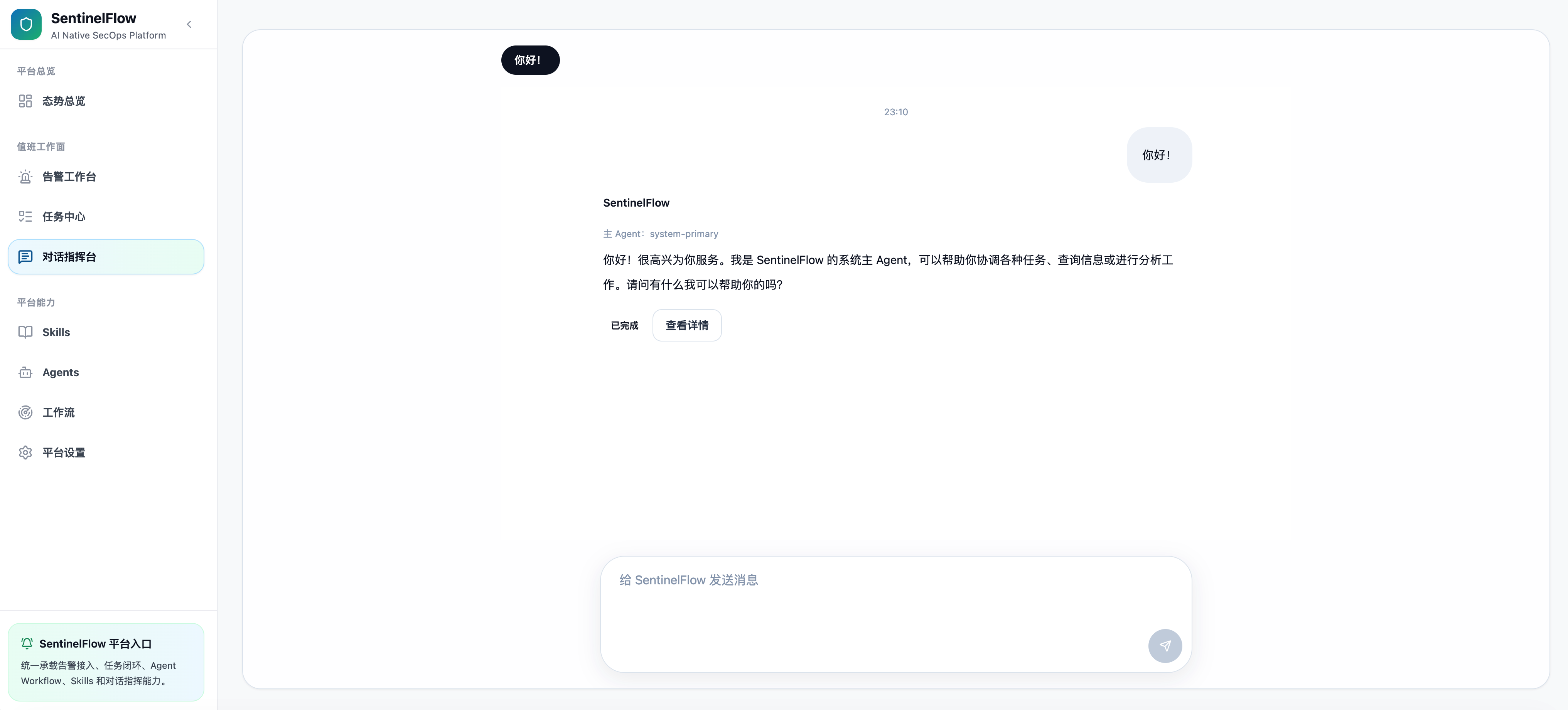
| Security Overview Dashboard | Conversation Console |
|---|---|
 |
 |
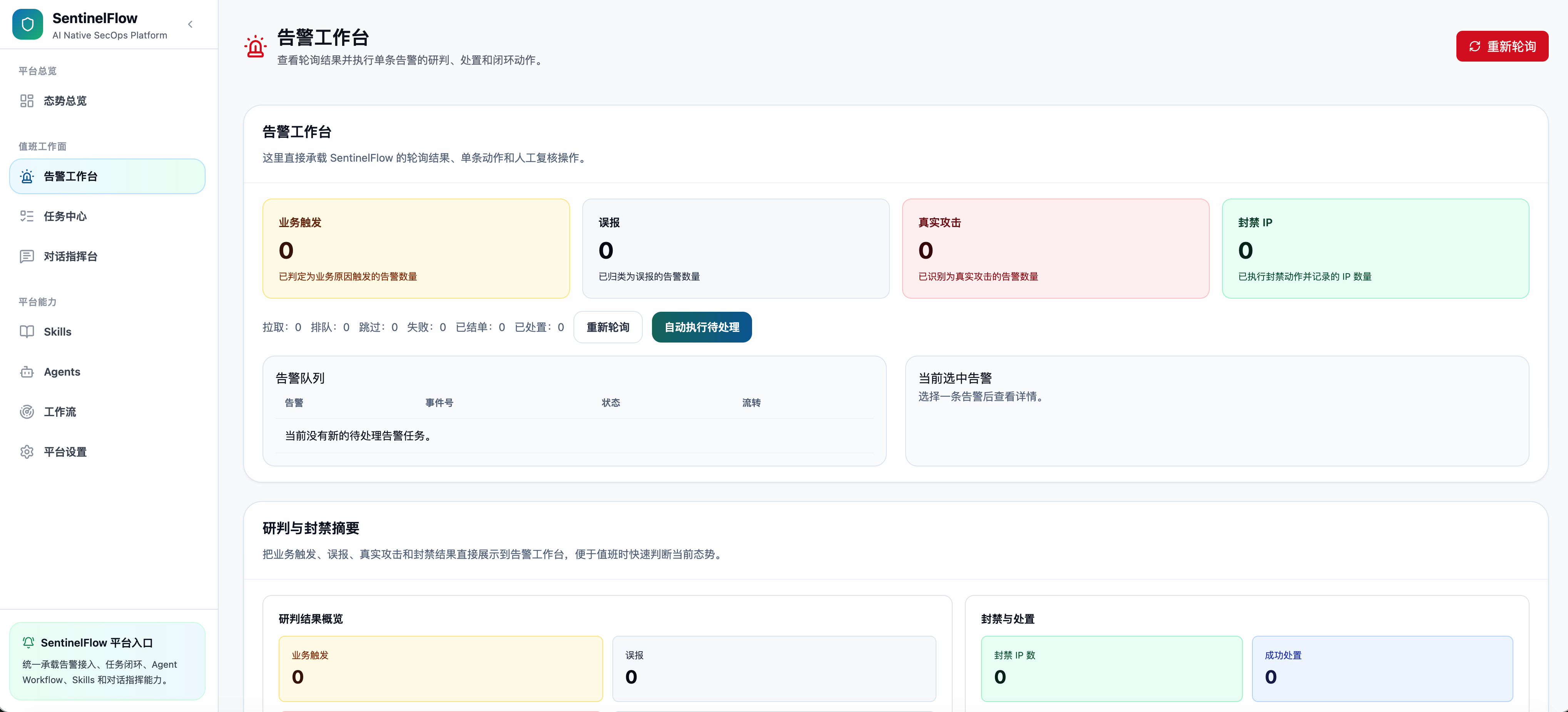
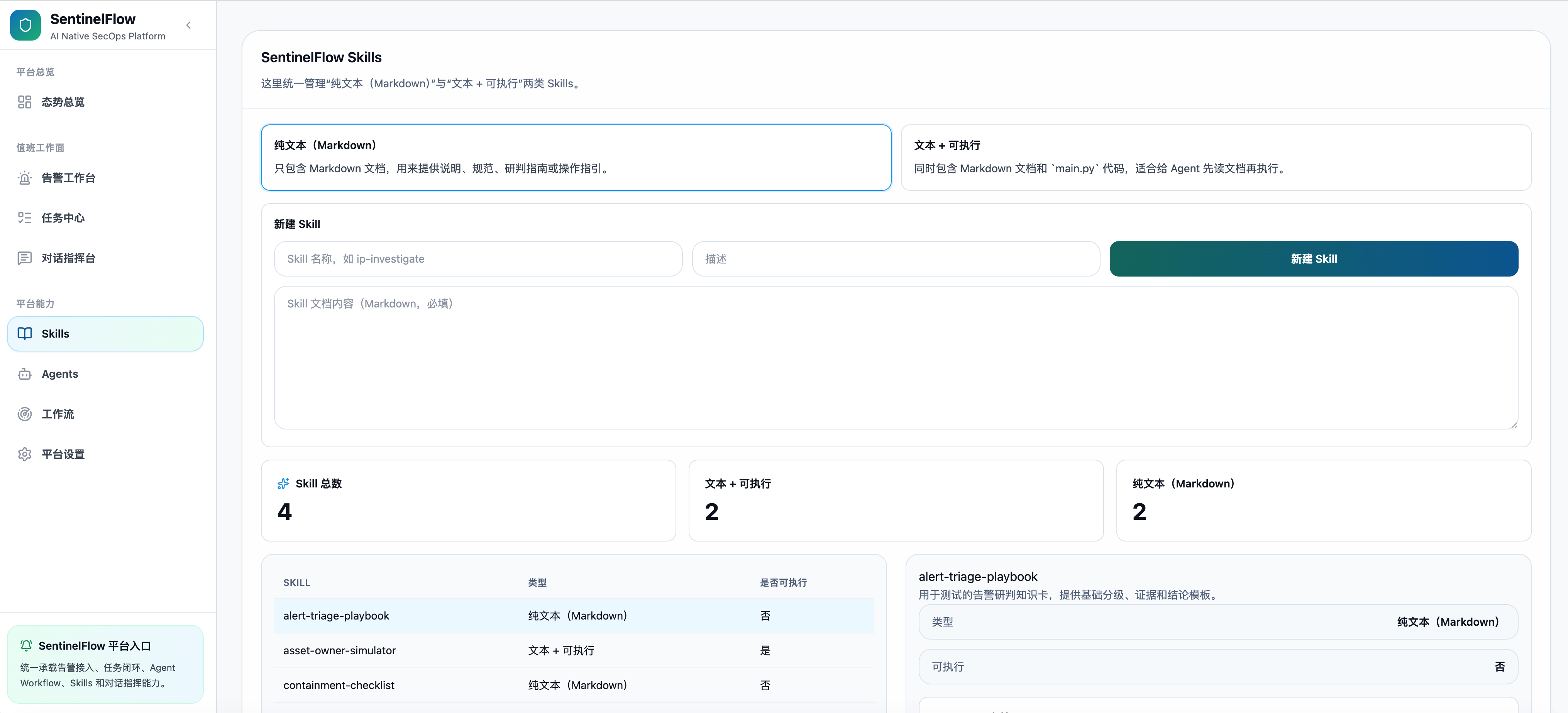
| Alert Workbench | Skill Management |
|---|---|
 |
 |
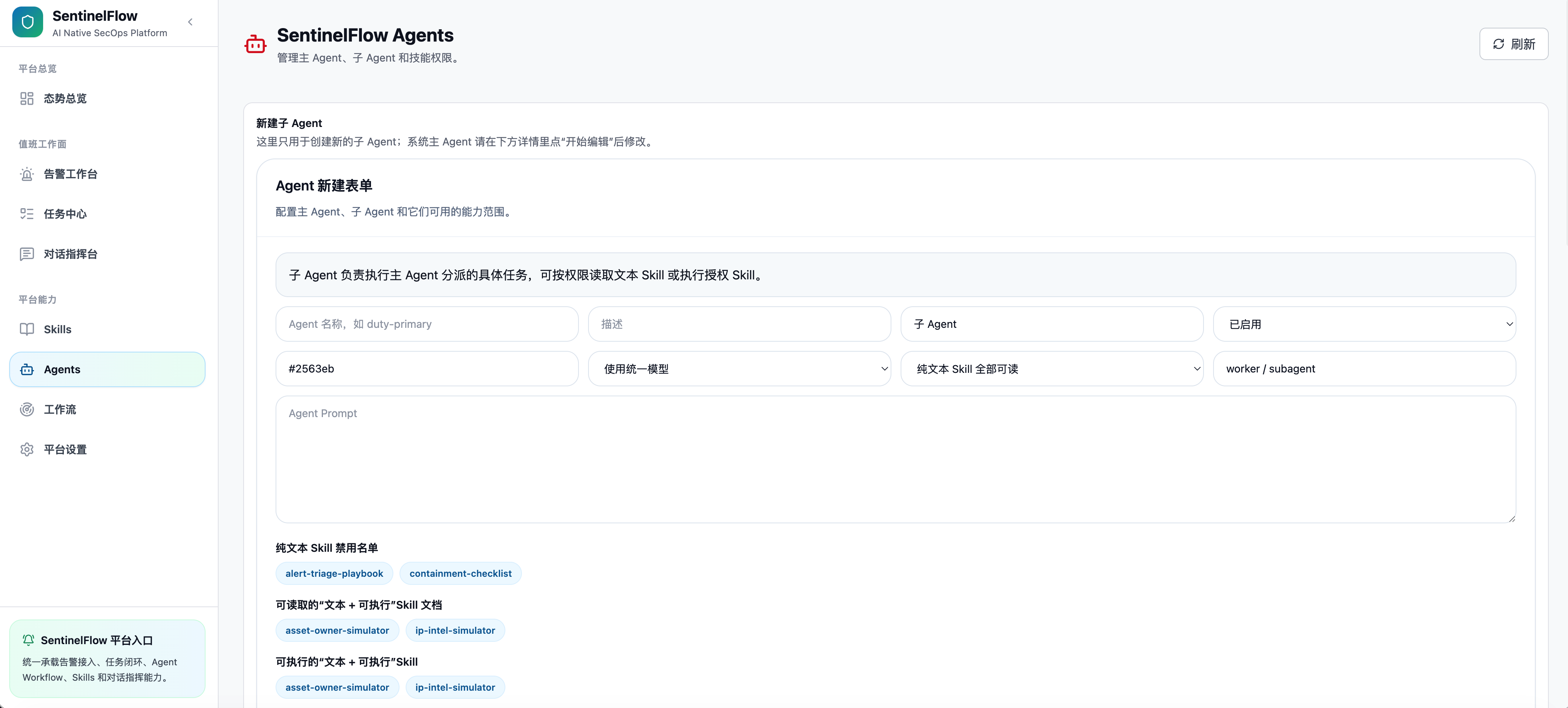
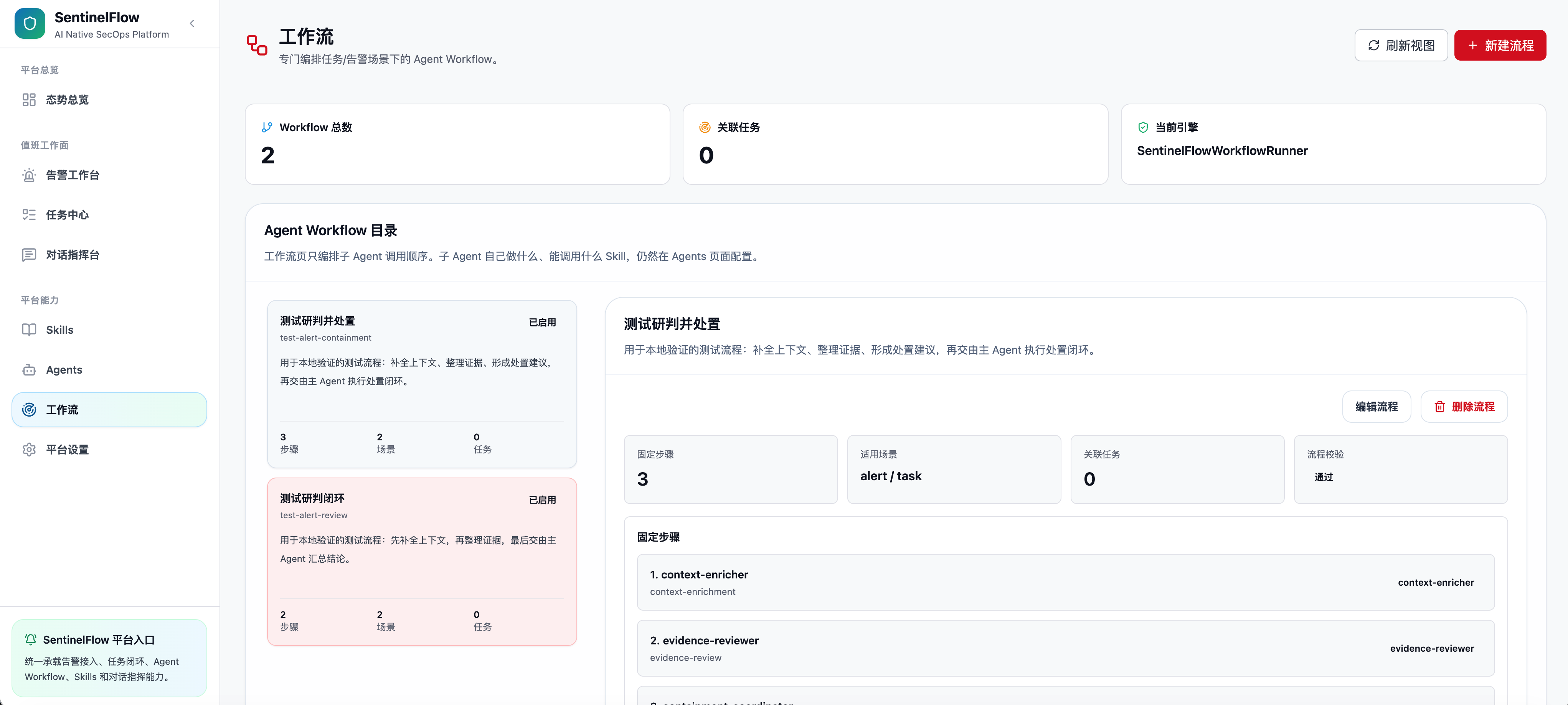
| Agent Management | Workflow Management |
|---|---|
 |
 |
- Supervisor + Worker SubGraph — Primary Agent uses LangGraph's
ToolNodeto delegate tasks to Worker Sub-Agents, each compiled as an isolated ReAct SubGraph wrapped as a@tool - Parallel Delegation — Primary Agent can dispatch multiple independent sub-tasks to different workers simultaneously via
delegate_parallel - Agent Workflow Engine — Define reusable workflows for common scenarios (e.g., phishing triage, IP enrichment + block);
run_workflowloads the fixed plan, while the Primary Agent remains responsible for calling each Worker with a complete task prompt - SOC Context Window Manager —
prepare_messages_for_llm()builds a prompt view before every Supervisor/Worker call: system prompt, current task anchor,case_context, recent ReAct turns, and compacted older tool results - Run-Local Case Context — During a single run, agents maintain structured facts such as goal, alert refs, actions taken, missing inputs, pending approvals, completed steps, and do-not-repeat hints
- Mode-Aware Worker Permissions — The Primary Agent can use different worker allowlists for conversation-style execution and alert-handling execution
- Prompt Variants & Synthesis — Primary Agents can define base, command, alert, and synthesis prompts, while Worker Agents keep a single execution prompt
- Cancellation & Step Limits — All graphs respect a
cancel_eventthreading flag;worker_max_stepscaps orchestration recursion depth
- SKILL.md-based discovery — Each skill is a directory with a
SKILL.md(YAML frontmatter + documentation body) and an optionalmain.pyentrypoint - Two skill types:
doc(knowledge-only, read by agent) andhybrid(doc + executable subprocess) - Per-agent permission control —
doc_skill_allowlist,exec_skill_allowlist,approval_requiredflags per skill;approval_requiredonly applies to the Conversation Console and manual single-alert handling, each execution is approved separately, while auto-execution / auto-retry / debug bypass approval - Schema-aware plain-text invocation —
execute_skillcan normalize plain JSON-string arguments, expose authorized skillinput_schemahints to the model, and preserve validation/audit records before subprocess execution - Subprocess execution — Skills run in isolated subprocesses with structured JSON I/O; audit logging built in
- Compact LLM surface — Large tool outputs and skill documents are kept in runtime state/run logs but summarized before they re-enter the LLM context
- In-WebUI Skill Management — Create, edit, delete, inspect, and debug skills directly from the dedicated Skills page
- Multiple named alert sources — Manage more than one upstream source from Settings; each source carries its own name, enablement state, parser, poll interval, retry interval, auto-execution flag, and optional source-specific analysis prompt
- Dual alert source types —
apimode polls any REST endpoint (configurable method, headers, query, body);scriptmode runs a custom Python script and reads its stdout as the alert payload - AI-powered parser generation — Paste a raw sample payload; the LLM auto-generates a
field_mappingparser rule with live preview and one-click apply - Fetch / Parse Validation — Test upstream fetches, import parser JSON, and preview parsed alert records before saving settings
- Flexible field mapping — Point-path-based rules map arbitrary JSON structures to SentinelFlow's canonical alert schema (
eventIds,alert_name,sip,dip,alert_time, etc.) - Source-aware deduplication & idempotency — SQLite-backed dedup store prevents re-queueing already-active alerts while keeping identical event IDs from different sources isolated
- Per-source polling scheduler — Each enabled source can poll on its own interval; the UI can trigger immediate polling for the selected source, while the API also supports all-source polling
- Large-queue query path — Alert queues use lightweight row/headline queries, denormalized result columns, index-friendly
sort_time, and dedicated period aggregates for dashboards plus weekly summaries - Fallback & retry — Failed tasks can be retried manually or automatically after the retry interval configured for the matching alert source
- SQLite-backed source-aware task queue — Alert handling tasks, source IDs, source names, and approval records are persisted to
.sentinelflow/sys_queue.dbby default; survives process restarts - Continuous source-scoped auto-execution — Enable the auto-executor loop per source to process queued tasks asynchronously without human action
- Automatic retry for failed tasks — Configure failed-task retry intervals per source to let SentinelFlow retry eligible failed alerts in the background
- Manual handling — Trigger single-task execution from the alert workbench at any time
- Task lifecycle —
queued → running → awaiting_approval / pending_closure / succeeded / failed / completed; manual approval can pause a task without losing checkpoint state - Full execution trace — Every task stores a structured
execution_tracecovering alert receipt, workflow usage, agent analysis, skill calls, approval state, closure result, and final status - Fact-based result convergence — Final status, judgment, disposal outcome, closure state, and workflow usage are converged into structured
final_facts - Completion Policy Semantics — Skill-level
completion_policydistinguishes enrichment, containment, notification, and closure effects so task state follows real execution facts rather than loose text summaries - Terminal execution integrity — For delegated closure/disposal tasks, SentinelFlow verifies that the worker produced a real closure-skill tool result instead of only describing the action in natural language
- Run Log Traceability — LLM prompt views, window statistics, worker boundaries, constructed skill arguments, approvals, and final task results are recorded for audit and troubleshooting
- Overview Dashboard — Unified platform summary for runtime health, task counts, agent/skill availability, judgment distribution, disposal outcomes, and recent activity
- Alert Workbench — Switch between alert sources, browse source-scoped task queues, start/stop automatic execution, manually trigger alert tasks, and inspect full alert context, approval state, and execution traces
- Task Center — Review queue state, retry failed work, approve pending skills, and inspect full-process execution details from a task-first view
- Conversation Console — Free-form command interface with multi-session history, streaming replies, collapsible worker/skill summaries, execution context details, and inline approval cards
- Configuration Center — Unified settings page for LLM credentials, thinking-model adapter, multi-source alert connection, parser rules, polling schedules, retry intervals, run-log retention, and auto-execution toggles — all persisted without restarting the server
- Stable cache-backed live refresh — Alerts, Overview, Skills, and Agents pages use shared stores with stale-while-revalidate style refresh, queued force reloads, and reduced duplicate fetches during high-frequency polling
- Settings dirty-state guard — The Settings form tracks actual persisted changes more accurately, reducing false unsaved-change prompts during normal editing
- RAG Settings — Configure the built-in RAG skill, retrieval parameters, API key, rerank model, and agent availability from the WebUI
- Run Log Viewer — Inspect per-alert execution logs, prompt windows, worker/skill events, and argument provenance from the Settings page debug panel
- Skill Management — Create, view, edit, and delete skills; run debug executions with custom arguments
- Agent Management — Configure Primary Agent and Worker Sub-Agents: prompts (default / alert / command / synthesis variants), LLM overrides, skill permissions, and mode-aware worker delegation
- Workflow Management — Create and edit Agent Workflows; run test executions from the UI
- FastAPI backend — Async Python runtime with structured JSON API; uvicorn server
- React + Vite frontend — TypeScript, TailwindCSS, component-based architecture
- Unified dev entrypoint —
python scripts/dev.py devstarts the full stack in one command - Source-first local layout — Runtime code lives under
runtime/, WebUI underwebui/, helper scripts underscripts/, and local plugin/runtime state is stored under the project-root.sentinelflow/workspace by default
System Architecture Diagram
┌─────────────────────────────────────────────────────────────────┐
│                   React WebUI (Vite + TS)                       │
│  ┌──────────────┐  ┌─────────────────┐  ┌───────────────────┐   │
│  │ Overview /   │  │ Conversation UI │  │ Plugin & Config   │   │
│  │ Alerts /     │  │  + approvals    │  │    Management     │   │
│  │ Tasks        │  │                 │  │                   │   │
│  └──────────────┘  └─────────────────┘  └───────────────────┘   │
└──────────────────────────┬──────────────────────────────────────┘
                           │  REST API (FastAPI)
┌──────────────────────────▼──────────────────────────────────────┐
│              SentinelFlow Runtime (Python / FastAPI)            │
│  ┌────────────────────────────────────────────────────────────┐  │
│  │               Multi-Agent Orchestrator                     │  │
│  │   ┌──────────────────────────────────────────────────┐    │  │
│  │   │  Primary Agent (Supervisor)                       │    │  │
│  │   │  LangGraph StateGraph + ToolNode                  │    │  │
│  │   │  Context Window → ReAct → Worker/Skill Tools      │    │  │
│  │   │    ↓ sequential / parallel worker delegation      │    │  │
│  │   │  ┌────────────┐  ┌────────────┐  ┌────────────┐  │    │  │
│  │   │  │  Worker A  │  │  Worker B  │  │  Worker C  │  │    │  │
│  │   │  │ ReAct Sub- │  │ ReAct Sub- │  │ ReAct Sub- │  │    │  │
│  │   │  │   Graph    │  │   Graph    │  │   Graph    │  │    │  │
│  │   │  └────────────┘  └────────────┘  └────────────┘  │    │  │
│  │   └──────────────────────────────────────────────────┘    │  │
│  └────────────────────────────────────────────────────────────┘  │
│  ┌────────────────────────────────────────────────────────────┐  │
│  │                    Skill Runtime                           │  │
│  │    loader → executor → subprocess isolation → audit log    │  │
│  └────────────────────────────────────────────────────────────┘  │
│  ┌────────────────────────────────────────────────────────────┐  │
│  │            Prompt Window & Run Log Traceability            │  │
│  │  task anchors → case_context → compact tool records        │  │
│  │  full state/checkpoints/run logs remain available          │  │
│  └────────────────────────────────────────────────────────────┘  │
│  ┌────────────────────────────────────────────────────────────┐  │
│  │              Alert Ingestion & Task Queue                  │  │
│  │  Multi-Source API/Script Poller → Parser → Dedup → Queue   │  │
│  │  Source-Scoped Auto-Executor → Task Runner → Agent/Workflow│  │
│  └────────────────────────────────────────────────────────────┘  │
└─────────────────────────────────────────────────────────────────┘
Core Design Patterns
- Supervisor + Worker SubGraph — Workers are compiled ReAct SubGraphs and wrapped as
@toolfunctions; compact summaries, key facts, action results, approvals, and errors surface back to the Supervisor - SOC context window control —
prepare_messages_for_llm()creates the actual LLM prompt view from full state, preserving task anchors and recent ReAct turns while compressing older tool records - Run-local case context —
case_contextcarries current goal, alert refs, facts, actions taken, missing inputs, pending approvals, completed steps, and do-not-repeat hints for the current run only - SKILL.md discovery — Skills are file-system plugins; no code changes needed to add new capabilities
- Dual entry types —
alert(JSON from SIEM) andconversation(human command); both routed through the same agent runtime - Source-aware SQLite task persistence — Alert tasks survive restarts; source-scoped event IDs and atomic status transitions prevent duplicate execution
- Atomic result serialization — All graph results pass through
_serialize_alert_resultfor a consistent, structured execution trace - Lossless audit / compact inference split — Full state, checkpoints, and run logs are retained; only the prompt sent to the LLM is windowed and compacted
Key Components
SentinelFlowAgentService— Top-level service; routes to orchestrator or single-agent graph; serializes resultsbuild_orchestrator_graph()— Compiles the Supervisor + Worker multi-agent LangGraphbuild_agent_graph()— Builds a single-agent ReAct SubGraph (used for both workers and standalone agents)context_utils— Builds context manifests, task anchors, case context, prompt windows, key facts, compact tool summaries, and pre-execution input checksRunLogTracer/AgentRunLogService— Records per-run LLM prompt views, window information, worker boundaries, skill calls, approvals, and final resultsAlertDispatchService— SQLite-backed source-aware task queue; handles create, dedup, status transition, and finalizationAlertPollingService— Per-source scheduler that polls enabled API/script alert sources and dispatches normalized alerts into the task queueAlertAutoExecutionService— Asyncio-based source-scoped executor loop; processes queued and retry-eligible tasks without human actionAlertParserGenerator— LLM-assisted + heuristic field-mapping rule generator for arbitrary JSON alert payloadsSentinelFlowSkillRuntime— Manages skill lifecycle; adapts skills as LangChain tools for agent useAgentWorkflowRegistry— Lists and resolves workflow definitions for multi-step Agent WorkflowsSkillApprovalService— Persists approval records and checkpoint resume state for human-in-the-loop executionweekly_alert_cleanup_service— Optional weekly cleanup for stored alert tasks and run artifactsAuditService— Records runtime audit events for dispatch, task execution, approval handling, and background services
Project Structure
.
├── pyproject.toml                      # Python package metadata & CLI entrypoint
├── scripts/
│   ├── dev.py                          # Unified local dev entrypoint
│   └── serve_webui.py                  # Production WebUI static file server
├── .sentinelflow/                      # Local plugins, runtime.json, SQLite queue (generated at runtime)
├── runtime/
│   └── sentinelflow/
│       ├── agent/
│       │   ├── service.py              # Top-level agent service (orchestration logic)
│       │   ├── orchestrator_graph.py   # Supervisor + Worker SubGraph builder
│       │   ├── graph.py                # Single-agent ReAct graph builder
│       │   ├── registry.py             # Agent definition loader (agent.yaml)
│       │   ├── prompts.py              # System prompts & appendix templates
│       │   ├── context_utils.py        # Context manifest, prompt window, case_context, compact records
│       │   ├── run_log_tracer.py       # LLM prompt/run-log event tracing
│       │   ├── skill_run_analyzer.py   # Skill/closure/action result convergence
│       │   ├── policy.py               # Per-agent skill permission resolver
│       │   ├── nodes.py                # LangGraph node implementations
│       │   ├── tools.py                # Agent-facing tool definitions
│       │   └── state.py                # Agent graph state schema
│       ├── skills/
│       │   ├── loader.py               # SKILL.md discovery & validation
│       │   ├── executor.py             # Skill subprocess execution
│       │   ├── adapters.py             # Skill → LangChain tool adapters
│       │   ├── resolver.py             # Local/plugin skill resolution
│       │   └── models.py               # Skill data models
│       ├── alerts/
│       │   ├── client.py               # Alert source HTTP/script client
│       │   ├── poller.py               # Scheduled polling service
│       │   ├── parser_runtime.py       # Field-mapping parser engine
│       │   ├── parser_generator.py     # LLM + heuristic parser rule generator
│       │   └── dedup.py                # Alert deduplication store
│       ├── services/
│       │   ├── agent_run_log_service.py # Per-alert JSONL run logs
│       │   ├── dispatch_service.py     # SQLite-backed task queue & lifecycle
│       │   ├── task_runner_service.py  # Task execution orchestration
│       │   ├── auto_execution_service.py # Continuous auto-executor loop
│       │   ├── skill_approval_service.py # Skill approval records + checkpoint persistence
│       │   ├── triage_service.py       # Rule-based alert disposition fallback
│       │   ├── weekly_alert_cleanup_service.py # Optional weekly cleanup
│       │   └── audit_service.py        # Audit event log
│       ├── tools/                      # Built-in operational tools
│       ├── workflows/                  # Agent workflow registry & runner
│       ├── api/                        # FastAPI route handlers
│       ├── config/                     # Runtime config loader (.env + persisted JSON)
│       └── domain/                     # Shared enums, models, errors
│   └── tests/                          # Runtime regression tests
├── webui/
│   └── src/
│       ├── components/                 # React UI components
│       ├── pages/                      # Page-level views
│       ├── api/                        # API client (fetch wrappers)
│       ├── hooks/                      # Custom React hooks
│       └── styles/                     # Global styles & Tailwind config
Development Guide
- Python 3.11+
- Node.js 18+ / pnpm 8+
- (Optional) A LangGraph-compatible LLM API key (OpenAI-compatible endpoint)
# Clone and set up Python environment
python -m venv .venv
source .venv/bin/activate
pip install -e ".[dev]"

# Install WebUI dependencies
cd webui && pnpm install && cd ..

# Start the full dev stack (backend + frontend)
python scripts/dev.py dev

# Start backend only
python scripts/dev.py backend

# Start WebUI dev server only
python scripts/dev.py webui-dev

# Build WebUI for production
python scripts/dev.py webui-build

# Serve a built WebUI bundle
python scripts/dev.py webui-serve
After editable install, you can also use the CLI directly:
sentinelflow dev
sentinelflow backendThe preferred way to configure SentinelFlow is through the WebUI Settings panel — all settings are persisted to .sentinelflow/runtime.json by default without requiring a server restart.
Alternatively, create a project-root .env file for environment-level defaults:
touch .envKey environment variables (all prefixed with SENTINELFLOW_):
# LLM Configuration (OpenAI-compatible)
SENTINELFLOW_LLM_API_KEY=sk-...
SENTINELFLOW_LLM_API_BASE_URL=https://api.openai.com/v1
SENTINELFLOW_LLM_MODEL=gpt-4o
SENTINELFLOW_LLM_THINKING_ADAPTER_ENABLED=false  # enable only for thinking-model adapters such as DeepSeek

# Alert Source
SENTINELFLOW_ALERT_SOURCE_ENABLED=false
SENTINELFLOW_ALERT_SOURCE_TYPE=api          # "api" or "script"
SENTINELFLOW_ALERT_SOURCE_URL=https://your-siem/api/alerts
SENTINELFLOW_POLL_INTERVAL_SECONDS=60

# Auto-execution
SENTINELFLOW_AUTO_EXECUTE_ENABLED=false

# Runtime
SENTINELFLOW_AGENT_ENABLED=true
SENTINELFLOW_RUN_LOG_RETENTION_DAYS=1
SENTINELFLOW_WEEKLY_ALERT_CLEANUP_ENABLED=false

# RAG skill defaults
SENTINELFLOW_RAG_ENABLED=true
SENTINELFLOW_RAG_KNOWLEDGE_ID=your-knowledge-id
SENTINELFLOW_RAG_API_KEY=sk-...Backend: Python 3.11 · FastAPI · uvicorn · LangGraph · LangChain · Pydantic v2 · python-dotenv · SQLite
Frontend: React 19 · TypeScript · Vite 7 · TailwindCSS · React Router
AI Runtime: LangGraph (StateGraph + ToolNode) · LangChain Core · langchain-openai
# Linux/Mac
python -m venv .venv
source .venv/bin/activate
pip install -e ".[dev]"
# Windows CMD
python -m venv .venv
.venv\Scripts\activate.bat
pip install -e ".[dev]"cd webui
pnpm install
cd ..python scripts/dev.py devThis starts:
- Backend API on
http://127.0.0.1:8001 - WebUI on
http://127.0.0.1:5173
For a production-like local preview, build the frontend and serve the static bundle:
python scripts/dev.py webui-build
python scripts/dev.py webui-serveOpen the WebUI and navigate to Settings. Configure your LLM endpoint and one or more alert sources — all settings are persisted immediately without a restart.
Alternatively, create a .env file for environment-level defaults:
touch .env
# Edit .env with your SENTINELFLOW_LLM_API_KEY, SENTINELFLOW_LLM_API_BASE_URL, etc.Create a new directory under .sentinelflow/plugins/skills/ (default local workspace) with a SKILL.md, or use the Skill Management page in the WebUI to create one directly:
---
name: get-ip-info
description: Query IP geolocation and threat intelligence for a given IP address
type: hybrid
mode: subprocess
entry: main.py
execute_policy:
  enabled: true
  approval_required: false
  audit: true
---

# get-ip-info

Query IP reputation, ASN, and geolocation using external threat intel APIs.

## Input

- `ip`: The IP address to look up

## Output

Returns a JSON object with `country`, `asn`, `reputation`, `is_malicious`.
The agent will automatically discover and invoke this skill when appropriate.
approval_required only affects two entry points: the Conversation Console and manual single-alert handling / manual retry. In those two entry points, every actual skill execution requires a fresh approval. When auto-execution is enabled, SentinelFlow will execute the skill directly even if approval_required: true is set.
What LLM providers does SentinelFlow support?
SentinelFlow uses an OpenAI-compatible API interface (langchain-openai). Any provider that supports the OpenAI Chat Completions API format works — including OpenAI, Anthropic (via proxy), DeepSeek, Qwen, local models via Ollama/LM Studio, and API relay services.
Configure the endpoint in the WebUI Settings or via environment variables:
SENTINELFLOW_LLM_API_BASE_URL=https://your-provider/v1
SENTINELFLOW_LLM_API_KEY=your-key
SENTINELFLOW_LLM_MODEL=model-name
For DeepSeek-style thinking models, enable Thinking Model Adapter in Settings or set SENTINELFLOW_LLM_THINKING_ADAPTER_ENABLED=true. When enabled, SentinelFlow sends thinking: {"type": "disabled"} to avoid provider-side reasoning_content replay errors. Leave it disabled for providers that do not support this request body.
What alert source types are supported?
SentinelFlow supports multiple named alert sources from the Settings panel. Each source can use one of two modes:
- API mode (
api): Polls any REST/HTTP endpoint. Supports GET/POST, custom headers, query parameters, and request body. Ideal for SIEM/SOAR platforms with a REST API. - Script mode (
script): Runs a Python script you write directly in the UI. The script should print a JSON object to stdout containingcountandalerts. Use this for custom data sources, local log files, or any integration that doesn't expose a REST endpoint.
Each source has its own parser rule, polling interval, failed-task retry interval, auto-execution flag, and optional alert-analysis prompt. Tasks are stored with source_id / source_name, and deduplication is scoped by source plus event ID.
How does the AI parser generation work?
Paste a sample alert JSON payload in the Settings panel and click Generate Parser. SentinelFlow sends the sample to your configured LLM, which returns a field_mapping rule that maps your schema's fields to SentinelFlow's canonical alert fields (eventIds, alert_name, sip, dip, etc.). A live preview shows how the rule would parse your sample. If the LLM call fails or is unavailable, a heuristic fallback rule is generated instead.
How do I define a Worker Sub-Agent?
Create a directory under .sentinelflow/plugins/agents/ (default local workspace) with an agent.yaml and optional prompt files, or use the Agent Management page in the WebUI:
# agent.yaml
name: ip-enrichment-worker
description: Specialized worker for IP enrichment and threat intel queries
role: worker
enabled: true
exec_skill_allowlist:
  - get-ip-info
  - virustotal-lookup
worker_max_steps: 3
The Primary Agent will automatically discover and delegate to this worker when appropriate.
How does the Primary Agent decide to use a Worker?
The Primary Agent (Supervisor) is bound with all available Worker Sub-Graphs as tools via LangGraph's ToolNode. On each reasoning step, the LLM decides whether to call a worker tool (sequentially or in parallel), invoke a preset workflow, or finish. The worker_max_steps setting caps the total number of delegation steps to prevent runaway orchestration.
What is auto-execution mode?
When enabled from the Settings panel, Alert Workbench, or SENTINELFLOW_AUTO_EXECUTE_ENABLED=true for the default source, SentinelFlow runs a background asyncio loop that continuously picks up queued tasks for enabled sources and executes them through the agent pipeline without requiring manual intervention. If a source has failed_retry_interval_seconds configured, eligible failed tasks from that source can also be retried automatically after the delay. You can stop automation per source from the UI.
Can I run SentinelFlow without an LLM API key?
The WebUI and alert ingestion pipeline work without an LLM key. However, the AI agent features (multi-agent orchestration, skill invocation, LLM-based triage, parser generation) require a configured LLM endpoint. The TriageService provides rule-based fallback disposition for alerts when the agent is not configured.
Where is project state stored?
- Agent definitions:
.sentinelflow/plugins/agents/by default - Skills:
.sentinelflow/plugins/skills/by default - Workflows:
.sentinelflow/plugins/workflows/by default - Runtime config (persisted from WebUI):
.sentinelflow/runtime.jsonby default - Task queue / approvals:
.sentinelflow/sys_queue.db(SQLite) - Run logs:
.sentinelflow/run_logs/by default - Environment defaults:
.envat project root (optional)
In the current project layout, the effective local workspace is the project-root .sentinelflow/ directory.
How do I define a fixed multi-step Agent Workflow?
Create a workflow.json file under .sentinelflow/plugins/workflows/<workflow-id>/ (default local workspace), or use the Workflow Management page in the WebUI. The Primary Agent uses structured LLM reasoning to select the best workflow for incoming alerts, or falls back to free ReAct if no workflow matches. In v1.1.0, run_workflow loads the fixed plan only; the Primary Agent still calls each Worker step itself and must provide a concrete task prompt for every step.
{
  "id": "phishing-triage-v1",
  "name": "Phishing Alert Triage Workflow",
  "description": "Standard phishing alert triage with URL analysis and sender verification",
  "enabled": true,
  "scenarios": ["phishing", "suspicious_email"],
  "selection_keywords": ["phishing", "malicious_url", "suspicious_sender"],
  "steps": [
    { "agent": "url-analysis-worker", "name": "URL Analysis", "task_prompt": "Analyze the URLs in this alert for malicious indicators." },
    { "agent": "sender-reputation-worker", "name": "Sender Check", "task_prompt": "Check the sender reputation and domain age." },
    { "agent": "closure-worker", "name": "Close Alert", "task_prompt": "Based on the above findings, close the alert with appropriate disposition." }
  ]
}- v1.3.0 — Large-queue performance hardening, more reliable WebUI live refresh, stricter real-action completion semantics, and cleaner configuration editing for production SOC workloads.
- Performance — Alert state APIs now use lightweight list/headline queries, denormalized result fields, index-friendly
sort_time, dedicated dashboard aggregates, and period summaries for weekly statistics. - WebUI — Alert, Overview, Skills, and Agents data loading is smoother under frequent polling through shared cache stores, background refresh, queued force reloads, and reduced duplicate fetches; Settings dirty-state detection now avoids false unsaved-change prompts.
- Runtime — Plain-text Skill calls normalize JSON-string arguments, expose authorized
input_schemahints, and keep validation/audit records tighter; delegated closure/disposal work now requires an actual closure Skill tool result instead of accepting prose-only completion claims. - Operations — Dashboard and workbench summaries remain stable on larger SQLite queues, and task result extraction is more reliable for judgment/disposal display.
- Performance — Alert state APIs now use lightweight list/headline queries, denormalized result fields, index-friendly
- v1.2.1 — WebUI performance and layout polish, runtime approval/logging fixes, and a fully independent frontend stack.
- WebUI — Stale-while-revalidate caching for alerts, skills, and agents; faster Alert Workbench / Skills / Agents list loading; collapsible Settings sections with collapsed summaries; collapsible
Surfacepanels; conversation message collapse; Chinese task lifecycle labels on Overview; Task Center execution detail improvements; independent Markdown styles and frontend scaffolding. - Runtime — Fix stale approval ID reuse on secondary approval; order tool-call summaries by real execution timeline; improve skill argument filling stability; top-level thinking-model request adapter; refine run-log display extraction.
- Project — Remove legacy third-party UI attribution files; keep runtime and business pages as SentinelFlow-native implementations.
- WebUI — Stale-while-revalidate caching for alerts, skills, and agents; faster Alert Workbench / Skills / Agents list loading; collapsible Settings sections with collapsed summaries; collapsible
- v1.2.0 — RAG settings, run-log tracing, expanded context management for longer tasks,
input_schemapre-execution validation, closure/completion logic tightening, SQLite/poller stability fixes, alert workbench and poll-store optimizations, thinking-model adapter, and broad WebUI polish. - v1.1.0 — Multi-agent execution integrity, source-aware alert tasks, workflow runner, prompt window management, run-log traceability, RAG settings, and thinking-model adapter.
This README is the current primary guide. More detailed user manuals for agent configuration, skill development, workflow authoring, API reference, and deployment are planned.
Issues and suggestions are welcome!
Before submitting PRs, please ensure:
- Python:
python -m pytest runtime/tests/passes - Keep runtime imports package-based under
sentinelflow.* - User-created skills, agents, and workflows belong under the local
.sentinelflow/plugins/workspace, not inside package source modules
For new features, please open an Issue for discussion before submitting a PR.
MIT License © SentinelFlow contributors
- 📧 Email: ch1nfo@foxmail.com
⭐ If this project is helpful to you, please give it a Star! ⭐