


Design your agent team on a canvas, watch them work, and edit right there.
See your AI agents think.
vibisual.pro — the project site · Docs · Blog






English · 简体中文
Coding agents don't type. They act — reading files, running commands, spawning other agents. Yet the tools we watch them with are still text: a terminal, a chat log, a list of tasks.
| Who writes the code | What you do | Examples | |
|---|---|---|---|
| IDE | You | Type it | VS Code, Cursor |
| ADE | The agent | Read the terminal | Warp |
| VDE | The agents | Watch the map | Vibisual |
A Visual Development Environment draws agent work as space instead of text — and keeps design, execution, observation, and editing on that one surface.
Claude Code hook events — including PreToolUse, PostToolUse,
UserPromptSubmit, and SessionStart — become nodes on a live
canvas. Sub-agent spawns become edges. Tool calls become child
bubbles. Folders and files light up as they are touched.
The output of a multi-agent session is a tree printed as a wall of text. Vibisual draws that tree as it grows.
The bubble map is both the runtime view and the design surface for
your harness. Instead of editing settings.json in a text editor, you
build the harness on a canvas:
- Place agents as nodes. Drop a bubble onto the canvas to define a new sub-agent. Each node carries its own configuration — model, permission mode, tools, isolation, max turns, effort level, skills, and per-agent rules.
- Wire them with edges. Connect agents with task edges to define handoffs and dependencies between them. The edges become the control-flow graph of your harness.
- The graph defines the harness. In the current early release, Vibisual reads the graph and launches the corresponding Claude Code sub-agent workflow. The same canvas you designed on is the canvas you watch the run on.
What used to be a buried settings.json tree is now a workflow you can
see, edit, and rearrange at any time.
Double-click a bubble and the workspace opens in place: the agent's live stream, a file tree, a code editor with syntax highlighting, diffs, and a terminal — all in the same window as the canvas.
You direct, the agents build, and when something needs a human hand you fix it on the spot instead of switching to another app.
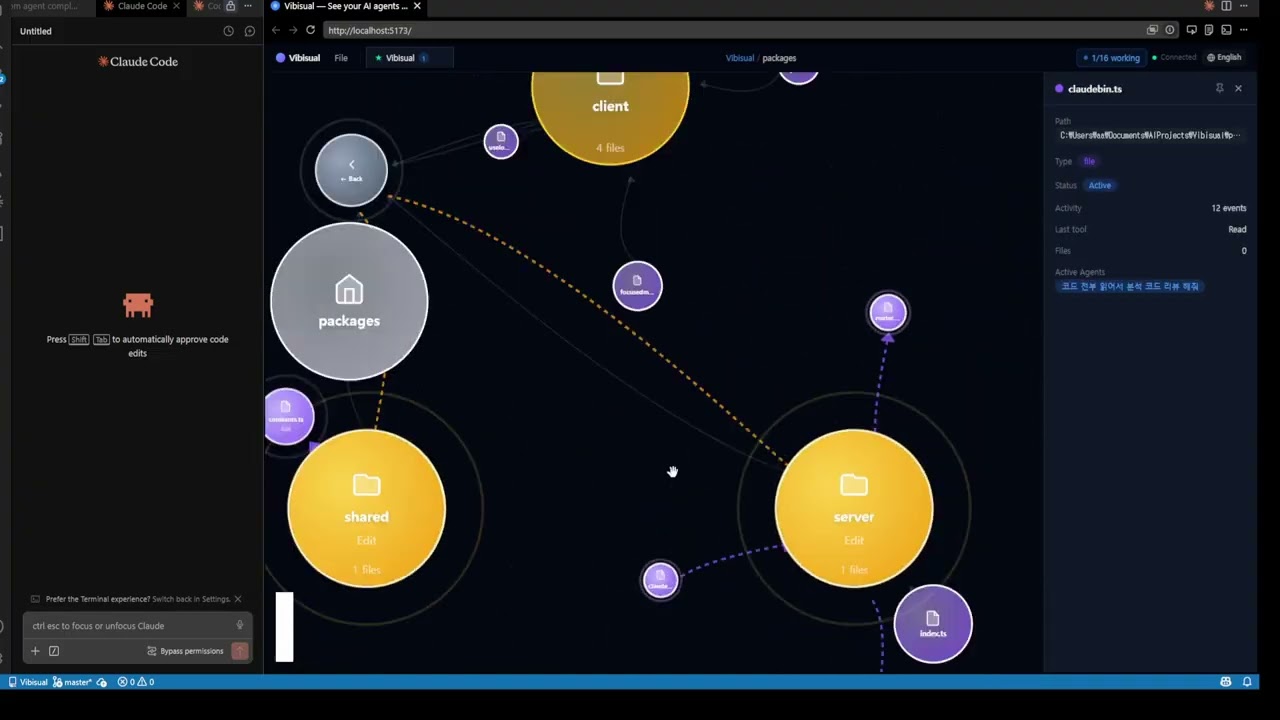
▶ Watch on YouTube — 2-minute walkthrough
Vibisual runs on top of the Claude CLI, which must already be installed and available on your PATH.
One line, if you would rather not pick a file yourself. Both scripts download a published release from GitHub and hand it to your system installer — read them first if you prefer (install.sh, install.ps1).
# macOS and Linux
curl -fsSL https://raw.githubusercontent.com/Vibisual/vibisual/main/scripts/install.sh | sh
# Windows
irm https://raw.githubusercontent.com/Vibisual/vibisual/main/scripts/install.ps1 | iexOr download the build for your platform from the Releases page:
| Platform | File | First launch |
|---|---|---|
| Windows (x64) | Vibisual-<version>-setup.exe |
Run it. Installs without a wizard, then launches. |
| Debian / Ubuntu / Mint | vibisual_<version>_amd64.deb |
Open it, or sudo apt install ./vibisual_<version>_amd64.deb. Dependencies are resolved for you. |
| Fedora / RHEL / openSUSE | vibisual-<version>.x86_64.rpm |
Open it, or sudo dnf install ./vibisual-<version>.x86_64.rpm. |
| Other Linux | Vibisual-<version>.AppImage |
Needs libfuse2 — see below. Prefer the .deb/.rpm if your distro takes one. |
| macOS (Apple Silicon) | Vibisual-<version>-arm64.dmg |
One extra command — see below. |
| macOS (Intel) | Vibisual-<version>.dmg |
One extra command — see below. |
macOS builds are unsigned, so Gatekeeper blocks the first launch: you get a
warning dialog instead of the app. Move Vibisual.app into
/Applications, then clear the quarantine attribute once:
xattr -cr /Applications/Vibisual.appIt opens normally after that, and you never need to repeat it. This is not guesswork — CI downloads the published dmg on a real macOS runner, attaches a browser-style quarantine attribute, confirms the app is blocked, and confirms that the command above unblocks it, on both Apple Silicon and Intel.
macOS also receives updates as a notification rather than installing them in place, for the same reason: the in-place updater requires a signature.
They install like any other package and need nothing else from you: your package manager pulls the libraries in, and Vibisual shows up in the application menu.
sudo apt install ./vibisual_<version>_amd64.deb     # Debian, Ubuntu, Mint
sudo dnf install ./vibisual-<version>.x86_64.rpm # Fedora, RHEL, openSUSEThe AppImage is there for distributions that take neither format (Arch, NixOS,
and friends). AppImages use FUSE 2, which recent distributions no longer ship —
Ubuntu 24.04 carries FUSE 3 only, and without FUSE 2 the file exits immediately
with dlopen(): error loading libfuse.so.2. Install it once:
sudo apt install libfuse2t64      # Ubuntu 24.04+ — "libfuse2" on 22.04 and older
chmod +x Vibisual-<version>.AppImage
./Vibisual-<version>.AppImage
If you would rather not install anything, unpack it instead. AppRun reads
its own location from APPDIR, which the AppImage runtime normally fills in,
so set it yourself when running the unpacked copy:
./Vibisual-<version>.AppImage --appimage-extract
APPDIR="$PWD/squashfs-root" ./squashfs-root/AppRungit clone https://github.com/Vibisual/vibisual.git
cd vibisual
pnpm install
# Build every package, then launch the desktop app
pnpm build
pnpm --filter @vibisual/desktop preview
# Build an installer for your platform
pnpm build:win # or build:mac, build:linuxOn first launch, Vibisual writes a managed hook block into
~/.claude/settings.json so Claude CLI sessions can stream into the
bubble map. A timestamped backup is kept next to it
(.bak-vibisual-*). If you'd rather wire hooks yourself, set
VIBISUAL_SKIP_HOOK_INSTALL=1 before first launch.
The published installers for Windows, macOS (Apple Silicon and Intel) and Linux are each downloaded, installed and launched on a real runner of that OS, so all three are known to start. Day-to-day development happens on Windows.
Vibisual is an early preview. This 0.1.x line is meant for experimentation, demos, and feedback: expect bugs, incomplete features, rough edges, and occasional breaking changes. Pin a version if you need one that holds still.
Tested mostly on Windows. Day-to-day development happens on Windows, so macOS and Linux get far less hands-on use. If something is broken on either, please open an issue — we'll fix it quickly.
It runs entirely on your own machine — no account, no telemetry, nothing sent to us — so what you point it at is your call, and nothing about your code leaves the room because you tried it.
Vibisual uses Claude Code hooks to visualize agent activity. Hook payloads may include prompts, tool calls, file paths, shell commands, session metadata, and other local development context.
Review the generated hook configuration before pointing Vibisual at a repository that holds secrets, credentials, private code, customer data, or production access — the same review you would give any tool that runs commands on your behalf.
Claude Code command hooks run with the permissions of your local user account. Only install and run hooks from code you trust.
Vibisual collects nothing — no account, no telemetry, no analytics, no crash uploads. PRIVACY.md lists exactly what leaves your machine and when, and SECURITY.md describes the security model and how to report a vulnerability privately.
The desktop app — the canvas, the IDE, the agents, the plugins — installs and runs with no account, no license key, and no usage cap, under Apache-2.0.
Paid add-ons may come later — extra capacity, work that runs somewhere other than your own machine, features built for teams.

Drawn from traction.csv
on the metrics branch — a daily snapshot of the numbers GitHub already
publishes about this repository. No third-party chart service is embedded here,
so opening this page does not report you to anyone.
Apache License 2.0 — see LICENSE. "Vibisual" and the Vibisual logo are trademarks of 길근오 (the project owner); see TRADEMARK.md for the policy.
By contributing, you agree to the DCO sign-off requirement and the additional contribution terms described in CONTRIBUTING.md, including permission for the project owner to relicense contributions for future commercial offerings.
Vibisual is an independent open-source project and is not affiliated with, endorsed by, or sponsored by Anthropic.
Claude, Claude Code, and Anthropic are trademarks or registered trademarks of Anthropic, PBC. All product names, logos, and brands are property of their respective owners.